Please refer to the following steps to add DKIM Record in MailEnable.
- Expand the PostOffice and Click on Domains.
- Right-Click on the Domain you want to set the DKIM and click on the properties.
- Select the DKIM (DomainKeys) and click on the Configure Button.
- Set the below DKIM Settings.
- Tick the Sign Outgoing messages
- Encryption algorithm : rsa-sha256
- Click on New Selector
- Enter the new selector name: default
- Keysize : 2048
- Click on OK Button on New Selector and it will generate the DKIM Record. Then, tick Make this the active selector and click on Update button. Finally, click the OK button.
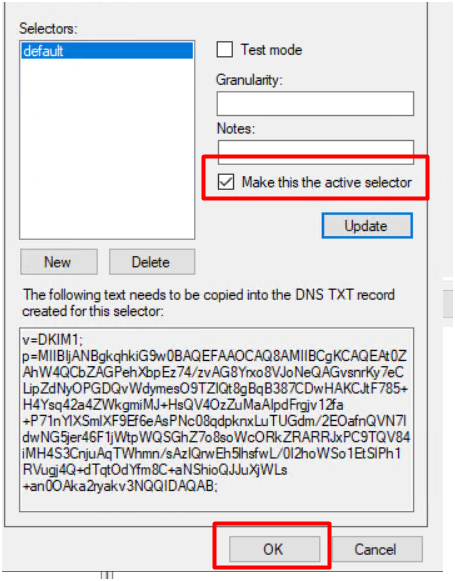
- Copy the generated DKIM Record and add it on your DNS service as TXT Record.
Article ID: 556, Created: August 24, 2020 at 3:25 AM, Modified: December 23, 2025 at 8:03 AM